Operational Shifts
Operational Shifts
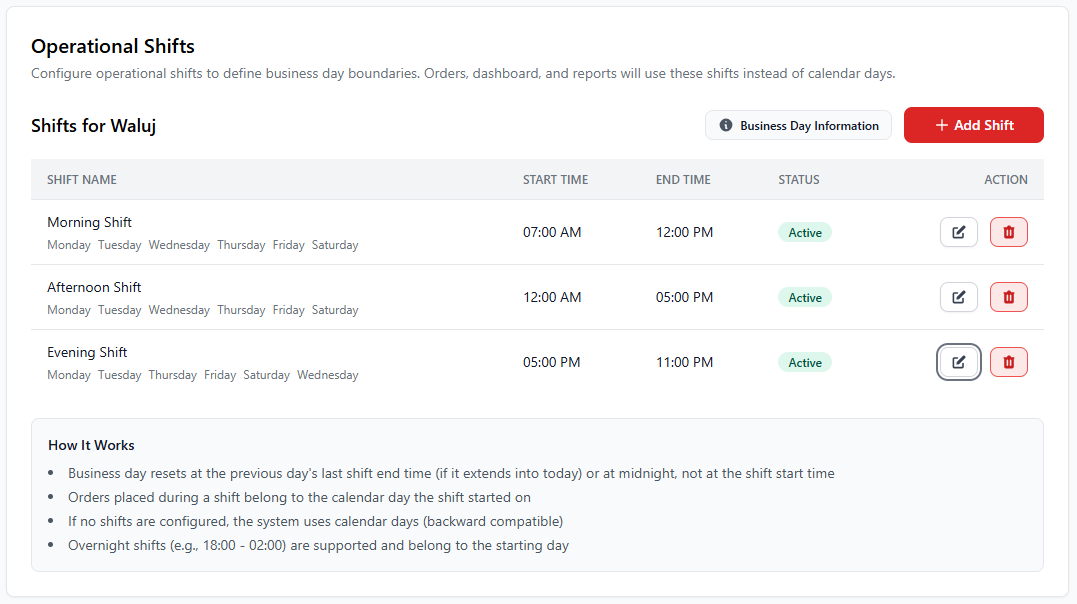
Operational Shifts allow restaurants to define working shifts for their business. Instead of using standard calendar days, the system tracks orders, reports, and operations based on configured shift timings.
1. What are Operational Shifts?
Operational shifts help restaurants divide their working hours into multiple time periods such as morning, afternoon, and evening shifts. This allows better management of staff, reporting, and order tracking.
- Define restaurant working hours
- Separate reporting by shift
- Track orders based on shift timings
- Manage staff schedules effectively
- Support overnight restaurant operations
2. Understanding Shift Table
Each shift created in the system includes several important fields that define when the shift starts and ends.
| Field | Description |
|---|---|
| Shift Name | Name of the shift such as Morning Shift, Afternoon Shift, or Evening Shift. |
| Start Time | The time when the shift begins. |
| End Time | The time when the shift ends. |
| Status | Shows whether the shift is currently active. |
| Action | Allows administrators to update or delete the shift. |
3. How Shifts Work in the System
The POS system uses operational shifts instead of standard calendar days to track orders and generate reports. This is especially useful for restaurants that operate late at night or across midnight.
- The business day resets after the final shift ends.
- Orders created during a shift are associated with that shift.
- Reports and dashboards use shift data instead of calendar days.
- Overnight shifts are supported.
4. How to Add a New Shift
- Navigate to Settings → Operational Shifts.
- Click the Add Shift button.
- Enter the shift name.
- Select the start time and end time.
- Choose the working days.
- Save the shift.
5. Example Shift Structure
| Shift Name | Start Time | End Time |
|---|---|---|
| Morning Shift | 07:00 AM | 12:00 PM |
| Afternoon Shift | 12:00 PM | 05:00 PM |
| Evening Shift | 05:00 PM | 11:00 PM |
6. Important Notes
Operational shifts define how reports and dashboards calculate business
days. Always configure shifts carefully to ensure accurate reporting.
For restaurants operating late at night, create an overnight shift such
as 06:00 PM – 02:00 AM to maintain accurate order tracking.