Payments Overview
Payments Dashboard
The Payments Dashboard provides a complete overview of all completed transactions in the system. It allows owners to track payment methods, transaction IDs, linked orders, and initiate refunds when necessary.
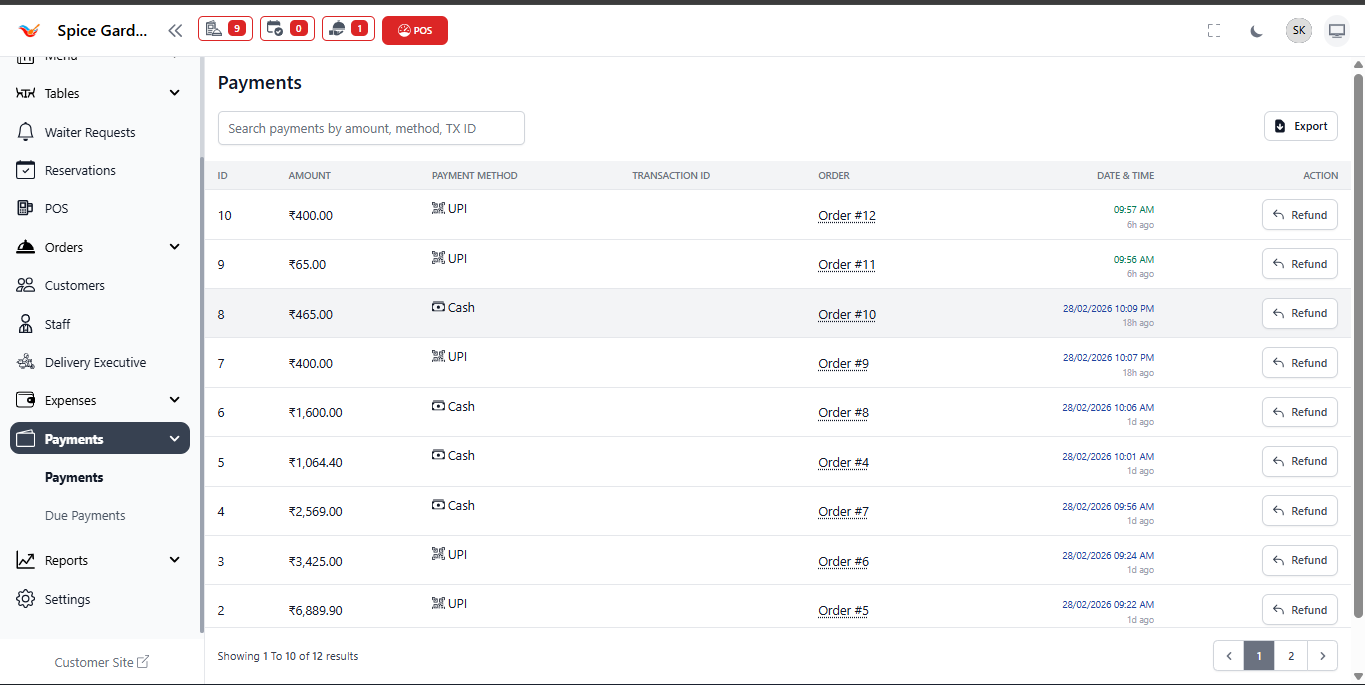
1. Payment Information Displayed
- ID – Unique transaction reference number.
- Amount – Total payment received.
- Payment Method – Cash, UPI, Card, or other methods.
- Transaction ID – Digital payment reference number.
- Order – Linked order number.
- Date & Time – Exact timestamp of transaction.
- Action (Refund) – Allows refund processing.
Every successful POS payment automatically appears in this section.
2. Search & Export
- Search payments using amount, method, or transaction ID.
- Use Export to download payment records for accounting.
Why Payments Dashboard is Important
- Ensures financial transparency.
- Helps track revenue by payment method.
- Supports auditing and reporting.
- Allows refund management.