Refund Reports
Refund Report
The Refund Report provides a detailed record of all refunded transactions processed within the system. It helps restaurant owners track refunded amounts, monitor refund reasons, and maintain financial transparency.
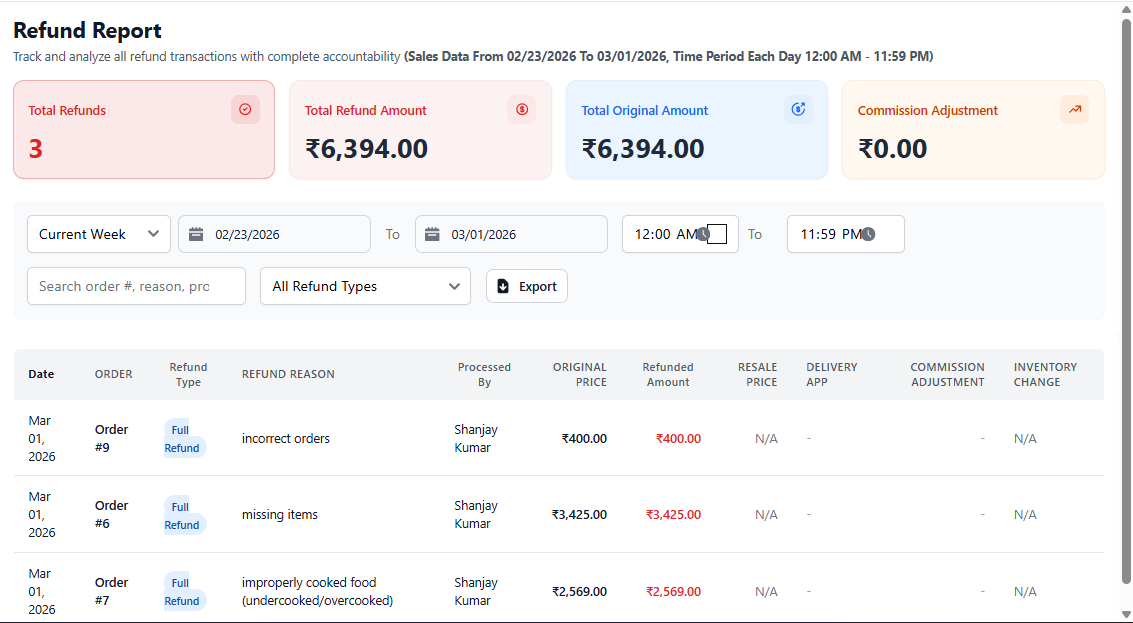
1. Purpose of Refund Report
This report captures every refund processed against orders, ensuring that revenue adjustments are properly recorded and audited.
Frequent refunds may indicate billing errors or operational issues that require attention.
2. Date & Filter Options
- Select predefined date ranges (Today, Week, Custom).
- Choose start and end dates.
- Filter refunds by staff or user.
- Export report for accounting or auditing purposes.
Analyze refund trends monthly to identify service or pricing issues.
3. Refund Details Table
The report includes the following refund information:
- Order Number – Reference order linked to refund.
- Refund Amount – Amount returned to customer.
- Refund Type – Full, Partial, or Waste Refund.
- Refund Reason – Explanation selected during refund.
- Processed By – Staff member who issued refund.
- Date & Time – Timestamp of refund processing.
This information ensures complete accountability and financial tracking.
4. Business Insights You Can Gain
- Monitor total refunded revenue.
- Identify frequent refund causes.
- Detect staff or billing mistakes.
- Improve service quality.
- Reduce financial losses.
5. Best Practice for Owners
- Review refunds weekly.
- Investigate high refund values.
- Maintain refund justification records.
- Train staff to minimize billing errors.